Contact & FAQ
Find answers to common setup issues below, or send us a message and we'll get back to you.
FREQUENTLY ASKED QUESTIONS
If your Level 2 Market Depth windows are blank, you may not have subscribed to the data feeds yet.
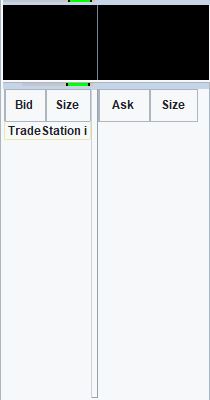
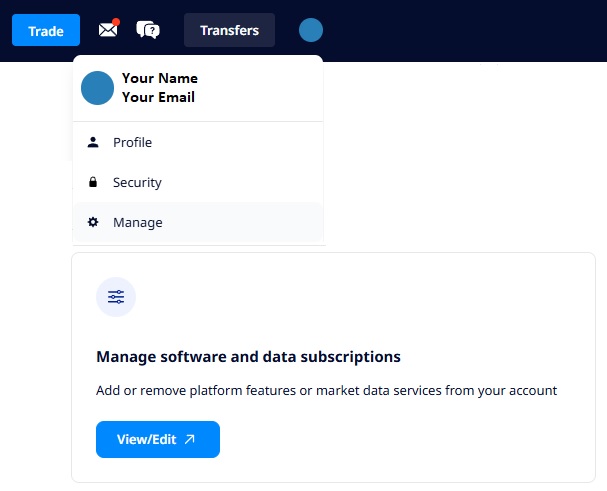
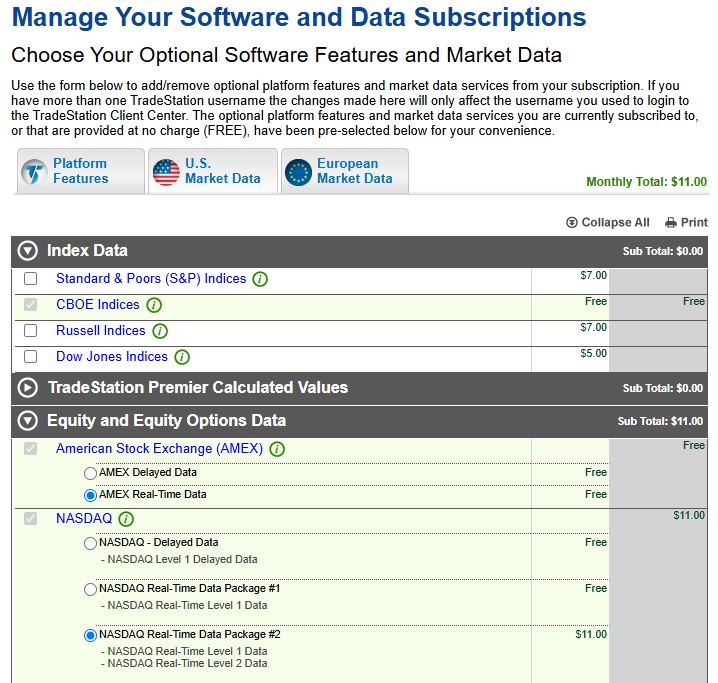
All brokers (including TradeStation) must charge for Level 2 Data. To enable this data feed:
No. Raider Trading's dashboard software does not connect to TradeStation directly, and never has access to your TradeStation login credentials or account access.
Instead, a pair of EasyLanguage indicators (installed by you, like any other TradeStation indicator) run natively inside your own TradeStation platform. These indicators use TradeStation's own, built-in tools to read position and order data and place orders, the same way any other TradeStation indicator or strategy does.
The only connection between these indicators and the Raider Trading dashboard is a pair of small text files on your own computer: one that TradeStation writes and the dashboard reads, and one that the dashboard writes and TradeStation reads. No network connection, API call, or external data transfer is involved.
For the full breakdown of how your account, password, and data are protected, see our Security page.
There are two separate Windows protections that can flag a new installer, and you may see one or both. Every Raider Trading installer is digitally signed with a code-signing certificate issued to Raider Trading LLC (you can confirm this yourself: right-click the installer, choose Properties, check the Digital Signatures tab), but a brand-new certificate still needs real-world download history to build up trust with Microsoft, so these can still appear, especially in a certificate's first few months, regardless of signing.
Windows SmartScreen shows up as a blue "Windows protected your PC" popup.
Smart App Control is a separate, stricter check that can block the installer outright before SmartScreen even gets a chance to show its own prompt. If the installer seems to just refuse to run with no clear popup to click through, this is likely why.
If you'd rather verify the file before running it, you're welcome to email us at contact@raidertrading.com for the installer's checksum to confirm it matches what we published.
SEND US A MESSAGE
Can't find your answer above? We're here to help.